
Skip to content
PPE background

AI Purchase Order to SAP Sales Order Automation

Manage purchase orders and business documents through one intelligent platform for receiving, reading, extracting, validating, and processing information. Replace manual data entry, document searching, repetitive verification, and follow-ups with an AI-powered workflow that converts documents into structured, accurate, and SAP-ready data.

SCHEDULE A DEMO
AI DOCUMENT ANALYSER

Transform Purchase Orders into
SAP-Ready Order Data

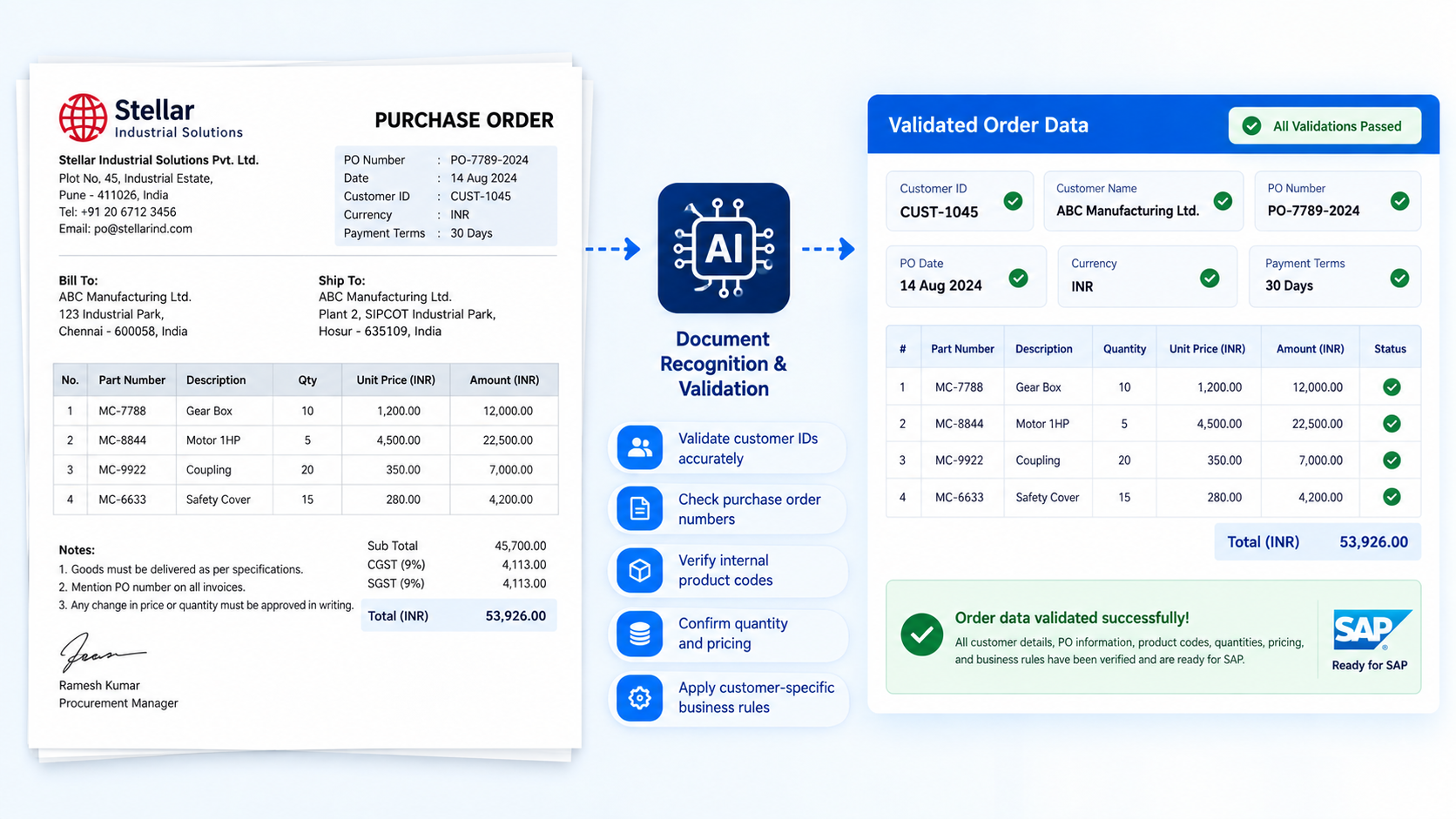
AI-powered document analysis transforms purchase orders into structured, validated order information by extracting line items, identifying customer and product codes, and preparing data for SAP Sales Order creation. The result is faster order processing, reduced manual data entry, improved accuracy, and a more controlled digital workflow.

Purchase
Order
AI Document
Recognition
Line-Item
Extraction
Item Code
Matching
Validation &
Approval
SAP-ready
Data
SAP
Sales
Order

AI Document Recognition

AI reads purchase orders received as PDFs, scanned documents, or through email and understands the information within them.

Line-Item Extraction

The system extracts multiple product line items, including quantities, prices, delivery dates, and other order information.

Item Code Matching

AI identifies the correct products and matches the extracted information with the appropriate customer and product codes.

Validation and Approval

The extracted order information is validated, allowing users to review and confirm the details before processing.

SAP-Ready Order Data

Validated information is converted into structured, SAP-ready data to accelerate Sales Order creation.

AI DOCUMENT ANALYSER

Advanced Capabilities for
Smarter PO-to-SAP Processing

AI-powered document analysis automates complex purchase order processing, from extracting multiple line items and adapting to different PO formats to validating data before SAP. With email automation, centralized master data, and SAP Sales Order processing, organizations can create a faster and more controlled order workflow.

Process Multiple PO Line Items Automatically
01.

Process Multiple PO Line Items Automatically

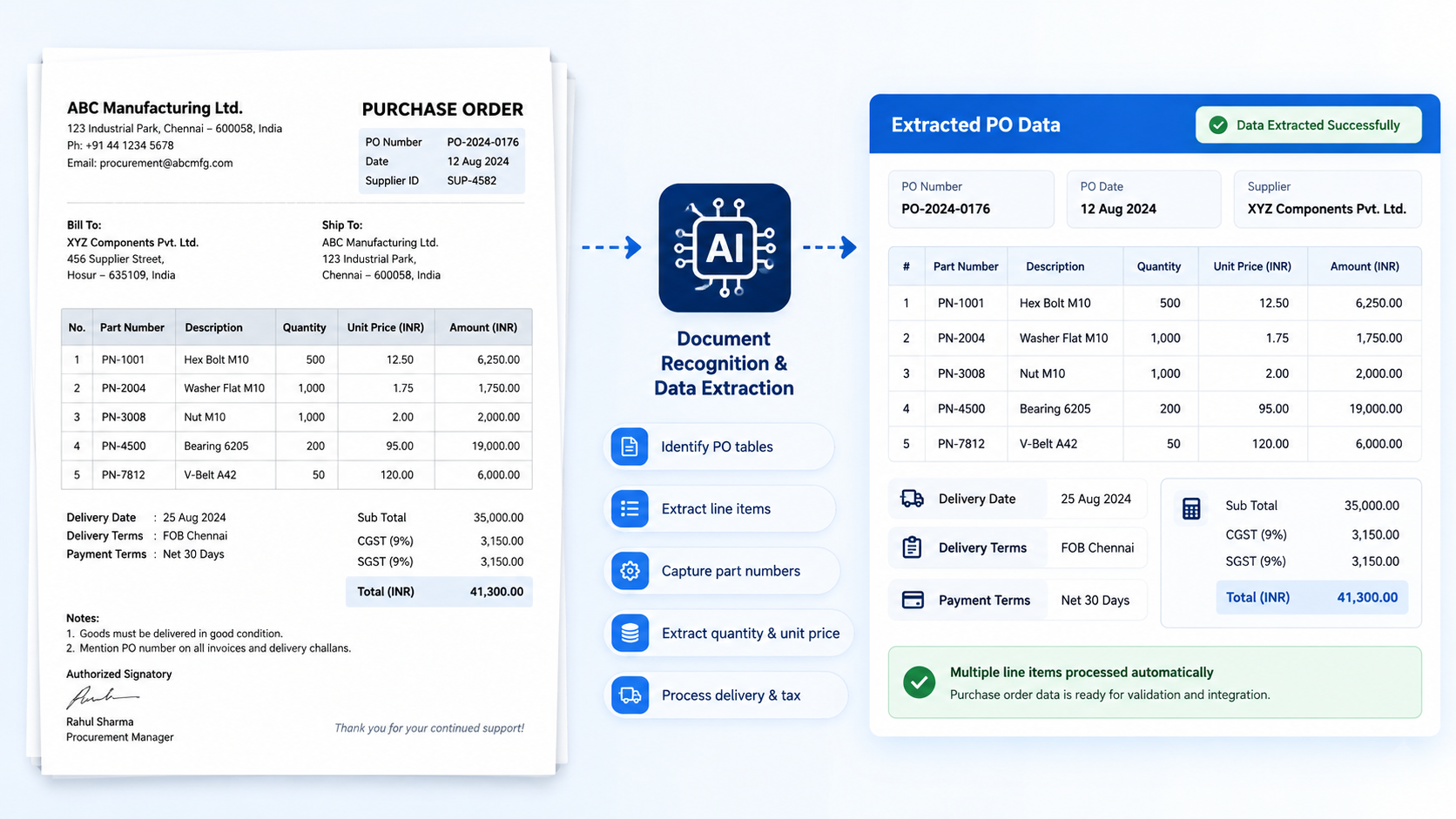
  • Identify purchase order tables
  • Extract individual line items
  • Capture part number details
  • Extract quantity and unit price
  • Process delivery and tax
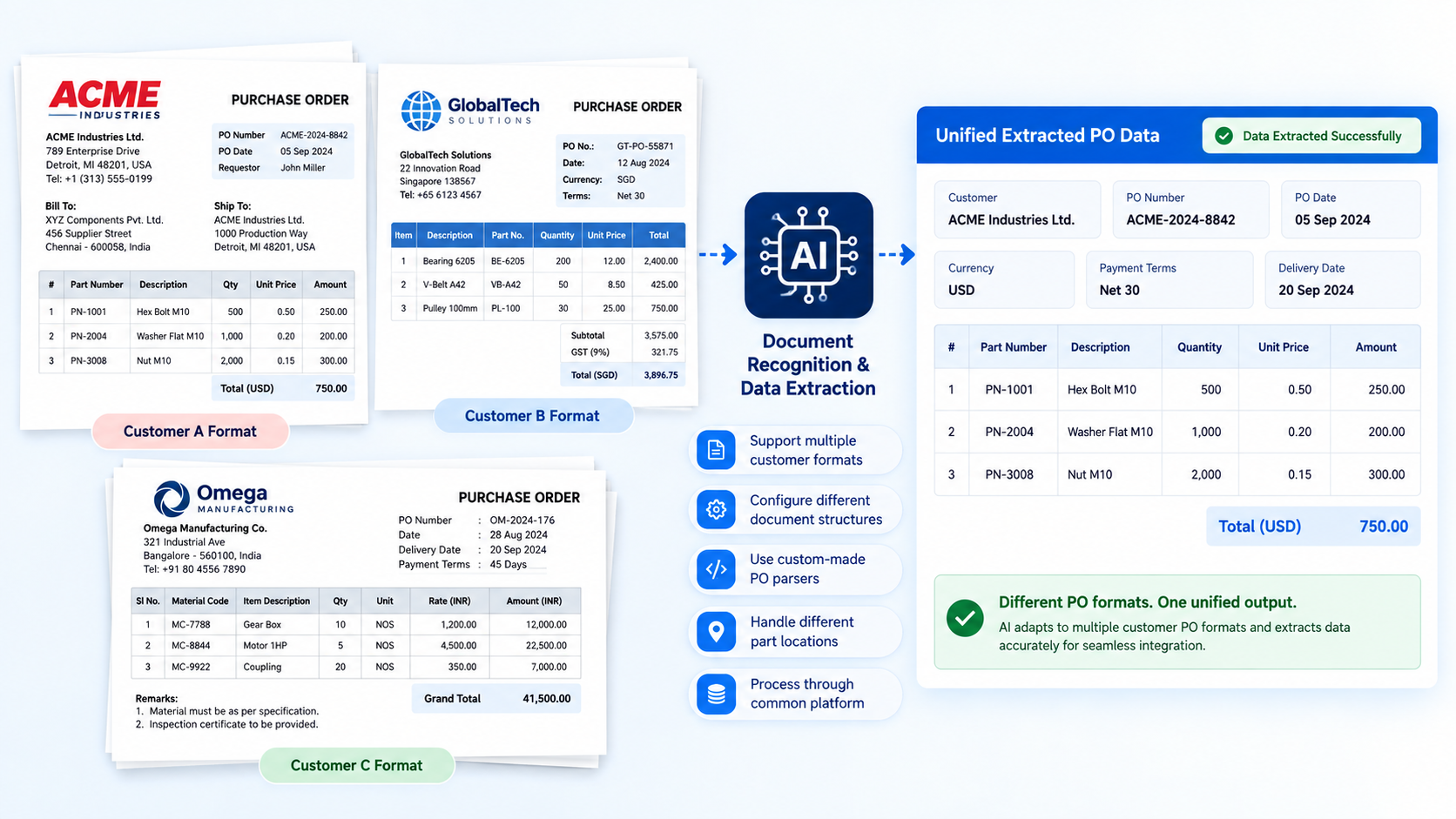
Adapt to Different Customer PO Formats
02.

Adapt to Different Customer PO Formats

  • Support multiple customer formats
  • Configure different document structures
  • Use custom-made PO parsers
  • Handle different part locations
  • Process through common platform
Validate Order Data Before SAP
03.

Validate Order Data Before SAP

  • Validate customer IDs accurately
  • Check purchase order numbers
  • Verify internal product codes
  • Confirm quantity and pricing
  • Apply customer-specific business rules
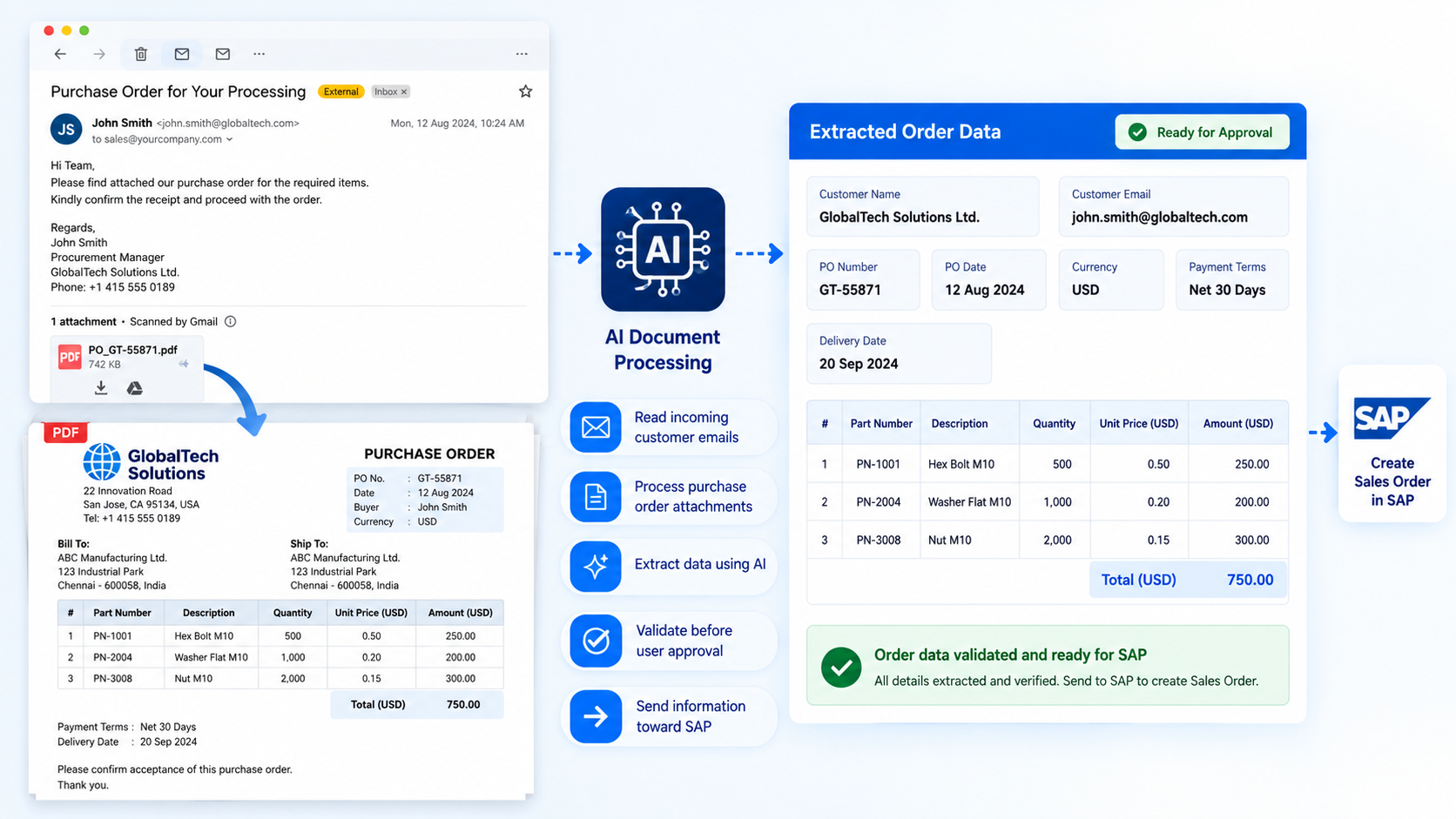
Automate Orders from Customer Emails
04.

Automate Orders from Customer Emails

  • Read incoming customer emails
  • Process purchase order attachments
  • Extract data using AI
  • Validate before user approval
  • Send information toward SAP
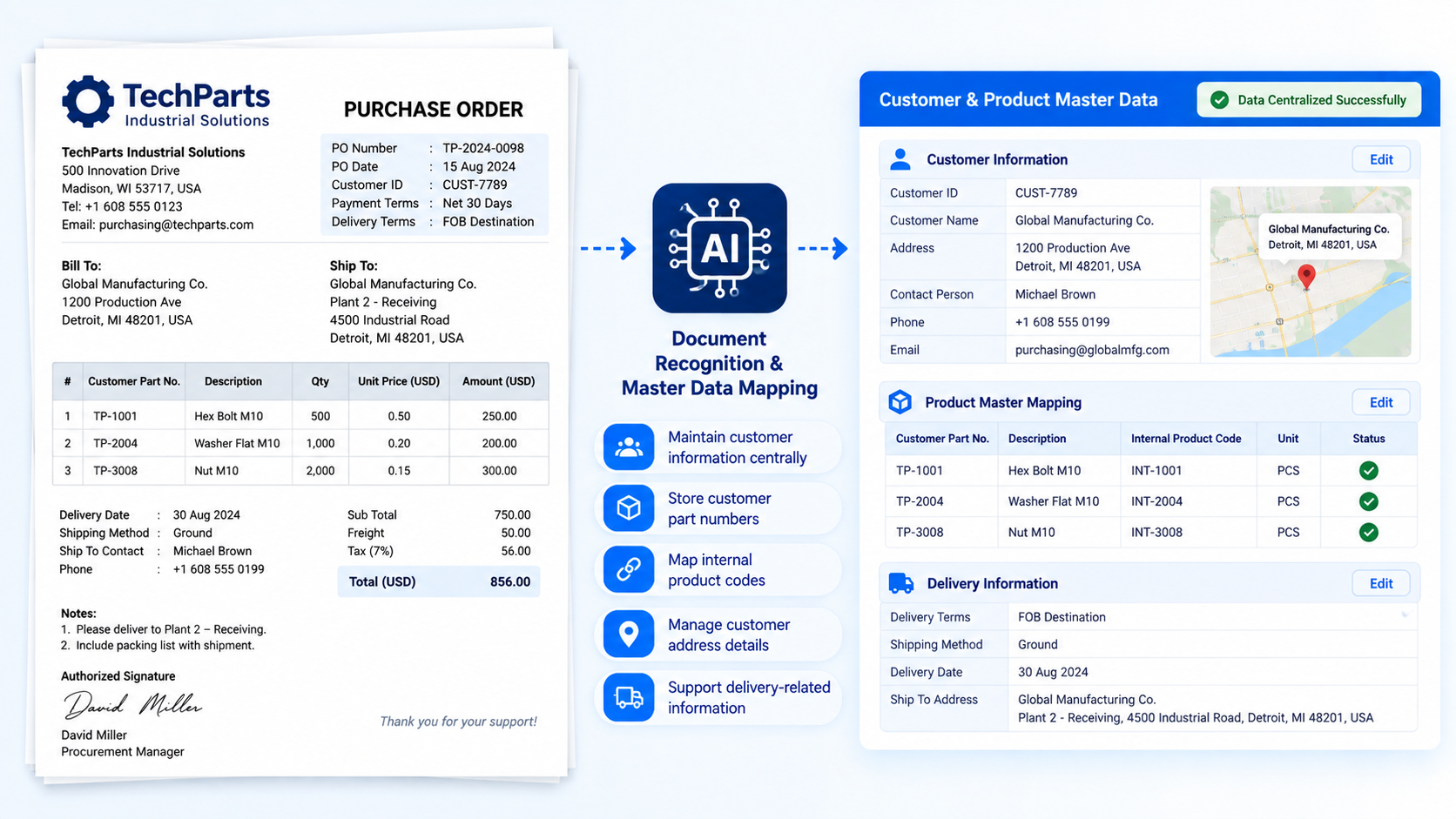
Centralize Customer and Product Masters
05.

Centralize Customer and Product Masters

  • Maintain customer information centrally
  • Store customer part numbers
  • Map internal product codes
  • Manage customer address details
  • Support delivery-related information
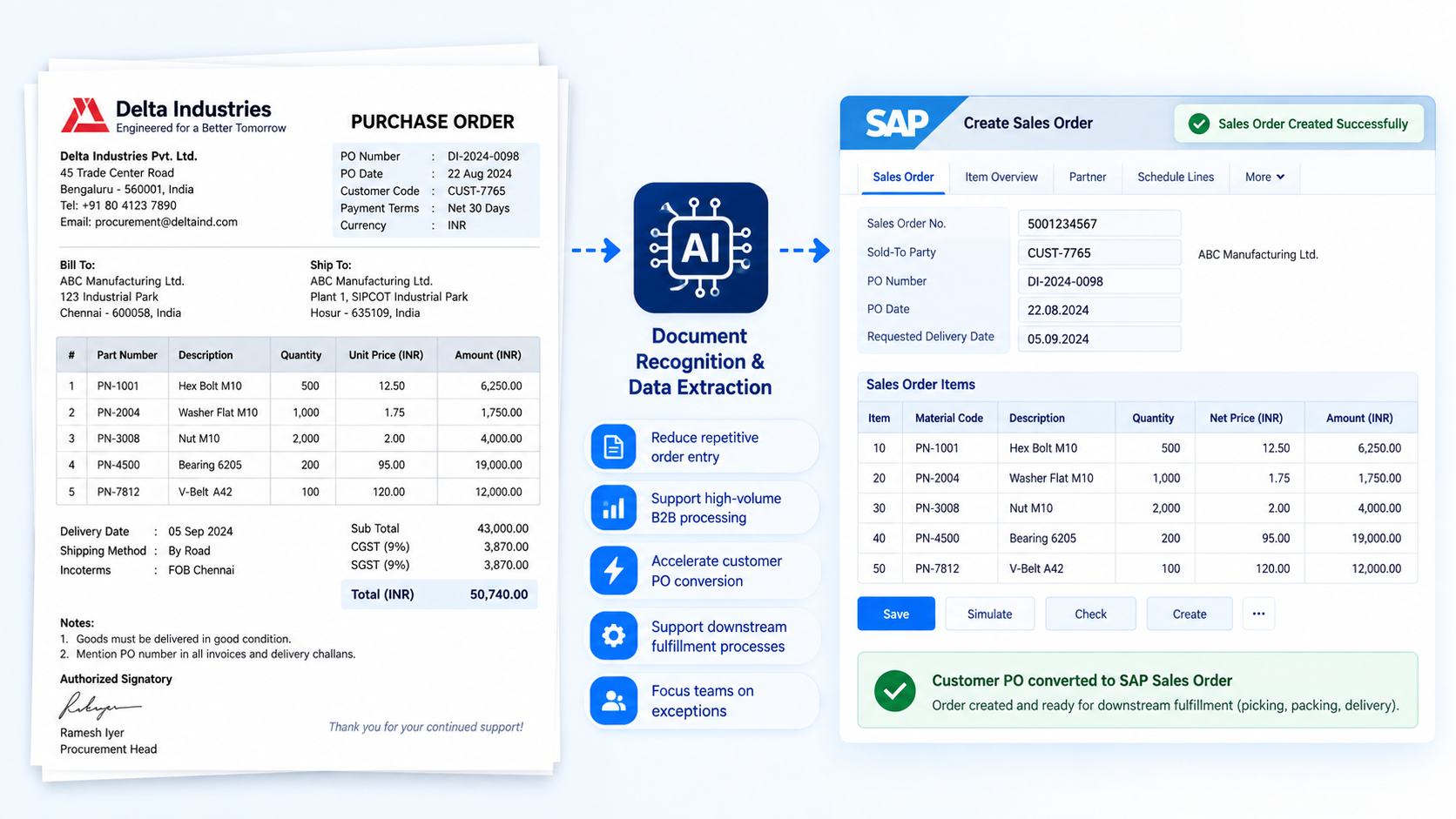
Accelerate SAP Sales Order Processing
06.

Accelerate SAP Sales Order Processing

  • Reduce repetitive order entry
  • Support high-volume B2B processing
  • Accelerate customer PO conversion
  • Support downstream fulfillment processes
  • Focus teams on exceptions
01. Process Multiple
PO Line Items
02. Adapt to Different
Customer PO Formats
03. Validate Order
Data Before SAP
04. Automate Orders
from Customer Emails
05. Centralize Customer
and Product Masters
06. Accelerate SAP
Sales Order Processing
AI DOCUMENT ANALYSER

Advanced Capabilities for
Smarter PO-to-SAP Processing

AI-powered document analysis automates complex purchase order processing, from extracting multiple line items and adapting to different PO formats to validating data before SAP. With email automation, centralized master data, and SAP Sales Order processing, organizations can create a faster and more controlled order workflow.

Adapt to Different Customer PO Formats
01.

Process Multiple PO Line Items Automatically

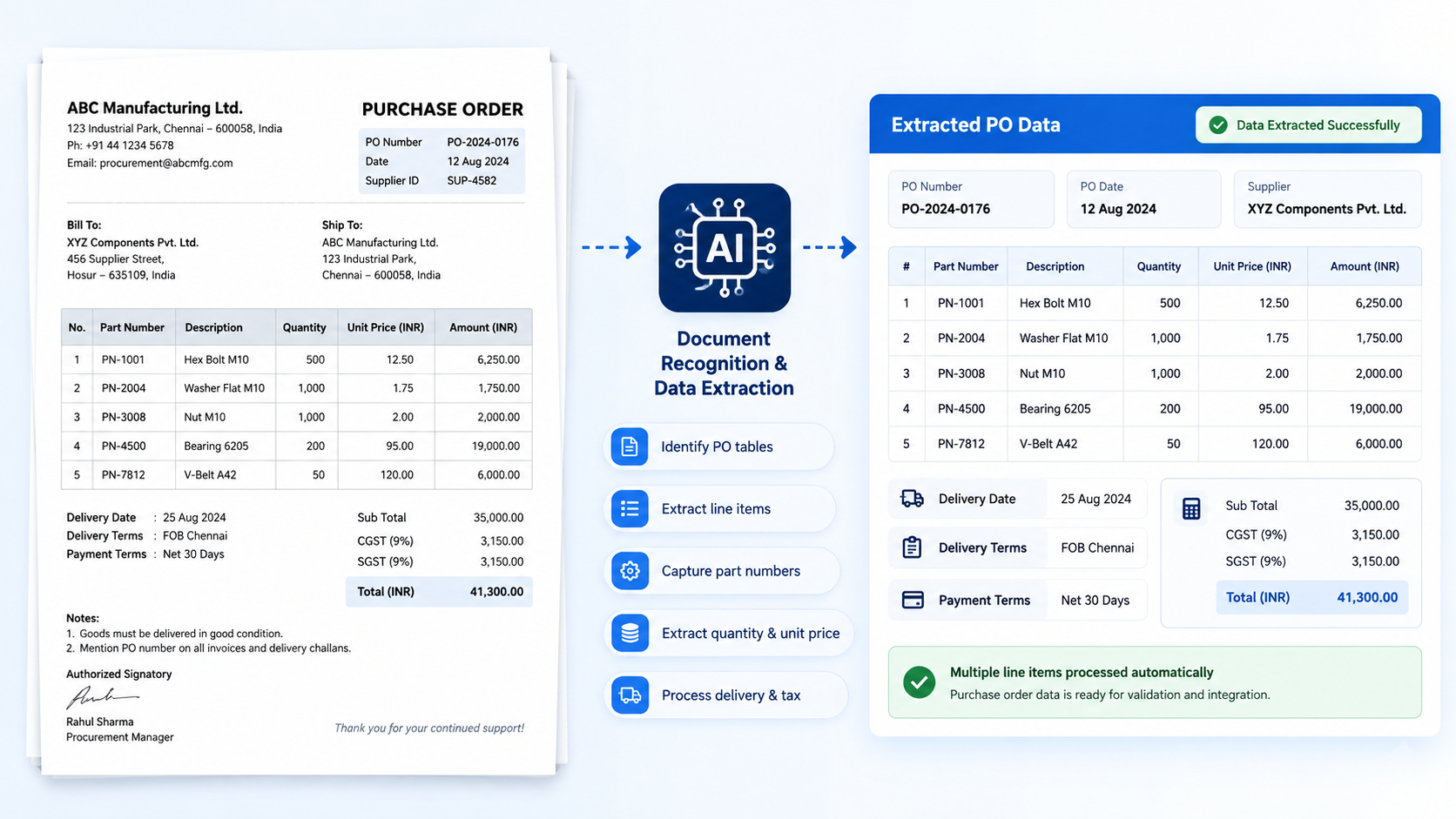
  • Identify purchase order tables
  • Extract individual line items
  • Capture part number details
  • Extract quantity and unit price
  • Process delivery and tax
Adapt to Different Customer PO Formats
02.

Adapt to Different Customer PO Formats

  • Support multiple customer formats
  • Configure different document structures
  • Use custom-made PO parsers
  • Handle different part locations
  • Process through common platform
Adapt to Different Customer PO Formats
03.

Validate Order Data Before SAP

  • Validate customer IDs accurately
  • Check purchase order numbers
  • Verify internal product codes
  • Confirm quantity and pricing
  • Apply customer-specific business rules
Adapt to Different Customer PO Formats
04.

Automate Orders from Customer Emails

  • Read incoming customer emails
  • Process purchase order attachments
  • Extract data using AI
  • Validate before user approval
  • Send information toward SAP
Adapt to Different Customer PO Formats
05.

Centralize Customer and Product Masters

  • Maintain customer information centrally
  • Store customer part numbers
  • Map internal product codes
  • Manage customer address details
  • Support delivery-related information
Adapt to Different Customer PO Formats
06.

Accelerate SAP Sales Order Processing

  • Reduce repetitive order entry
  • Support high-volume B2B processing
  • Accelerate customer PO conversion
  • Support downstream fulfillment processes
  • Focus teams on exceptions
01. Process Multiple
PO Line Items
02. Adapt to Different
Customer PO Formats
03. Validate Order
Data Before SAP
04. Automate Orders
from Customer Emails
05. Centralize Customer
and Product Masters
06. Accelerate SAP
Sales Order Processing

Go Beyond OCR with Intelligent Document Analysis

AI-powered document understanding goes beyond simply converting purchase orders into text by recognizing document structures and extracting meaningful information.
It understands forms, recognizes text, identifies tables, and converts extracted information into structured data for downstream processing.

Understand Different PO Formats

AI can understand where important information is located within different purchase order formats and document layouts.


  • Recognize different PO structures
  • Locate important information accurately
  • Understand form layouts intelligently
  • Process multiple document formats
  • Identify structured information fields

Extract and Structure Order Data

AI identifies text and multi-line-item tables and converts extracted information into usable structured data.


  • Extract text from documents
  • Identify multi-line item tables
  • Structure extracted order information
  • Capture quantity and unit price
  • Prepare data for processing
AI DOCUMENT ANALYSER

Keep Order Processing on Track with Intelligent Exception Handling

When AI finds information it cannot process or validate, the order is prevented from continuing incorrectly and the exception is recorded for corrective action. This creates a human-in-the-loop workflow where AI handles repetitive processing while users review and resolve exceptions.

Possible Exception

Resolution step

Unknown Customer
Send for review
Part Number Not Found
Request mapping or update
Incorrect Quantity
Flag for validation
Missing PO Number
Hold processing
Unrecognized PO Format
Route for manual review
Validation Failure
Record error and notify responsible user
AI DOCUMENT ANALYSER

Move from Repetitive Order Entry to
Intelligent Processing

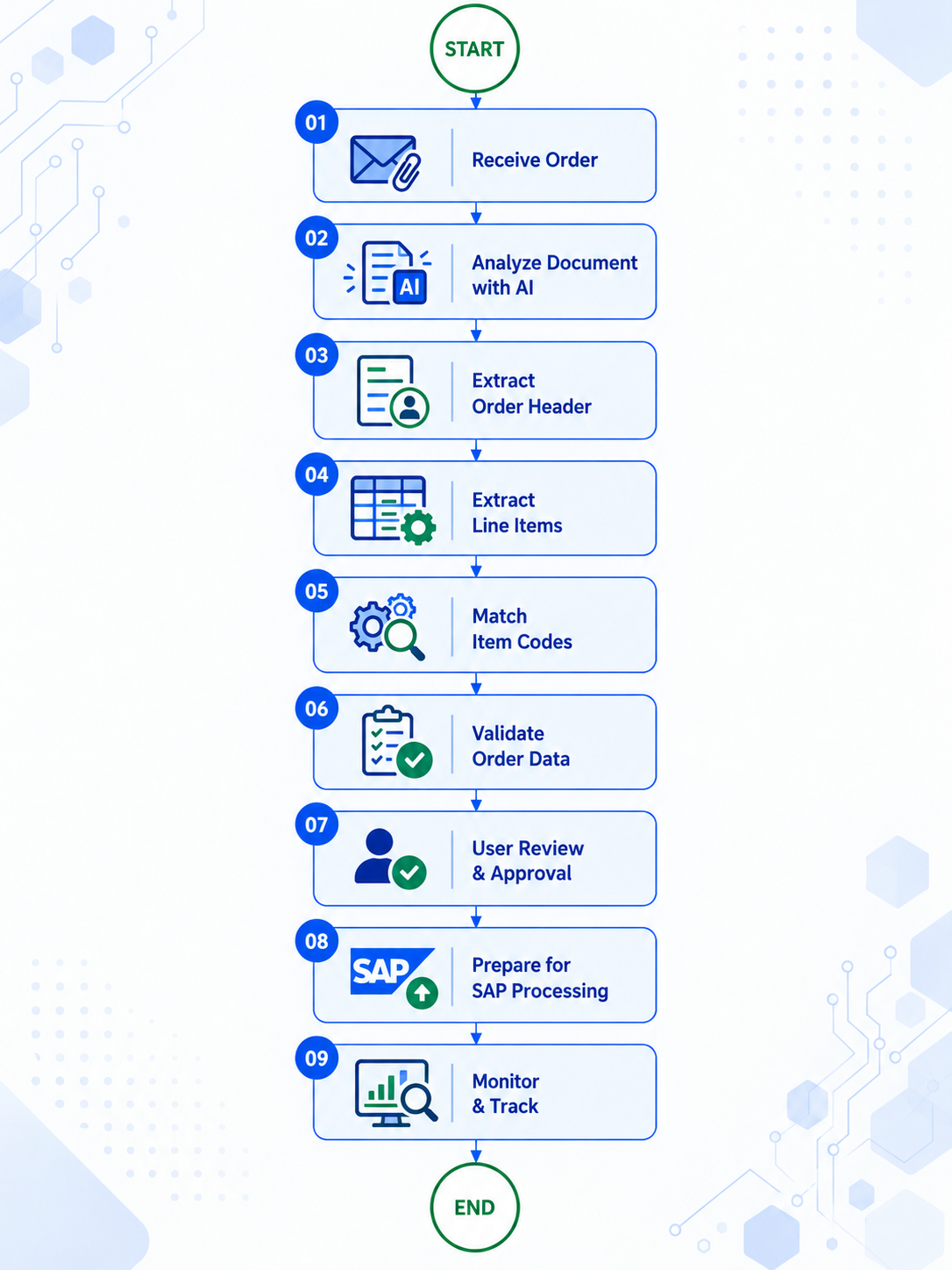
Processing a customer purchase order with multiple line items can require significant repetitive effort when every detail must be manually read, searched, entered, and verified. AI-assisted processing streamlines the journey by extracting, mapping, validating, and preparing order information for SAP with reduced manual intervention.

Traditional Approach

Open
Email
Download
PDF
Read
PO
Find
Customer
Search
Part Numbers
SAP
Create SAP
Sales Order
Verify
Enter
Prices
Enter
Quantities
Enter
Line Items

The traditional approach requires significant repetitive effort and manual data entry at every stage of order processing.

AI-Assisted Approach

Receive
PO
AI Reads
Document
Extracts Header
& Line Items
Maps
Item Codes
Validates
User
Confirms
SAP
SAP
Processing

The AI-assisted approach reduces manual intervention by automating document reading, data extraction, item code mapping, and validation.

Everything You Need for Intelligent PO Processing

AI-powered document processing brings purchase order recognition, data extraction, validation, approval, and SAP-ready processing into one streamlined workflow. From incoming emails and multi-line items to error management and audit visibility, every stage helps create a more controlled order-processing process.

  1. 1

    AI-Powered PO Recognition

    Automatically read and understand customer purchase orders by identifying relevant information and document structures.

  2. 2

    Multi-Line Item Data Extraction

    Extract dozens or hundreds of PO line items and convert product information into structured data.

  3. 3

    Customer and Item Code Identification

    Identify customers and map customer part numbers to the appropriate internal product codes.

  4. 4

    Customer-Specific PO Processing

    Configure processing rules and custom parsers to handle different customer purchase order formats.

  5. 5

    Email and Attachment Processing

    Read incoming customer emails and automatically process purchase order attachments within the workflow.

  6. 6

    Validation, Approval and Confirmation

    Apply user-defined validation rules and allow users to review and confirm extracted PO information.

  7. 7

    SAP-Ready Order Processing

    Prepare validated order information in a structured format for SAP processing through the configured interface.

  8. 8

    Error Management and Notifications

    Capture erroneous orders, support corrective action, and notify relevant users about processing events.

  9. 9

    Audit Visibility and Excel Export

    Maintain visibility into document processing activities and download processed information in Excel format when required.
Request Demo
Facility issue management resolution workflow diagram

Key Features of AI-powered Document Processing Software

AI-powered document processing brings purchase order recognition, data extraction, validation, approval, and SAP-ready processing into one streamlined workflow. From incoming emails and multi-line items to error management and audit visibility, every stage helps create a more controlled order-processing process.

AI-Powered PO Recognition

Automatically read and understand customer purchase orders by identifying relevant information and document structures.

Multi-Line Item Data Extraction

Extract dozens or hundreds of PO line items and convert product information into structured data.

Customer and Item Code Identification

Identify customers and map customer part numbers to the appropriate internal product codes.

Customer-Specific PO Processing

Configure processing rules and custom parsers to handle different customer purchase order formats.

Email and Attachment Processing

Read incoming customer emails and automatically process purchase order attachments within the workflow.

Validation, Approval and Confirmation

Apply user-defined validation rules and allow users to review and confirm extracted PO information.

SAP-Ready Order Processing

Prepare validated order information in a structured format for SAP processing through the configured interface.

Error Management and Notifications

Capture erroneous orders, support corrective action, and notify relevant users about processing events.

Audit Visibility and Excel Export

Maintain visibility into document processing activities and download processed information in Excel format when required.

Benefits

Why Manufacturers Choose Our AI-powered Document Processing Software?

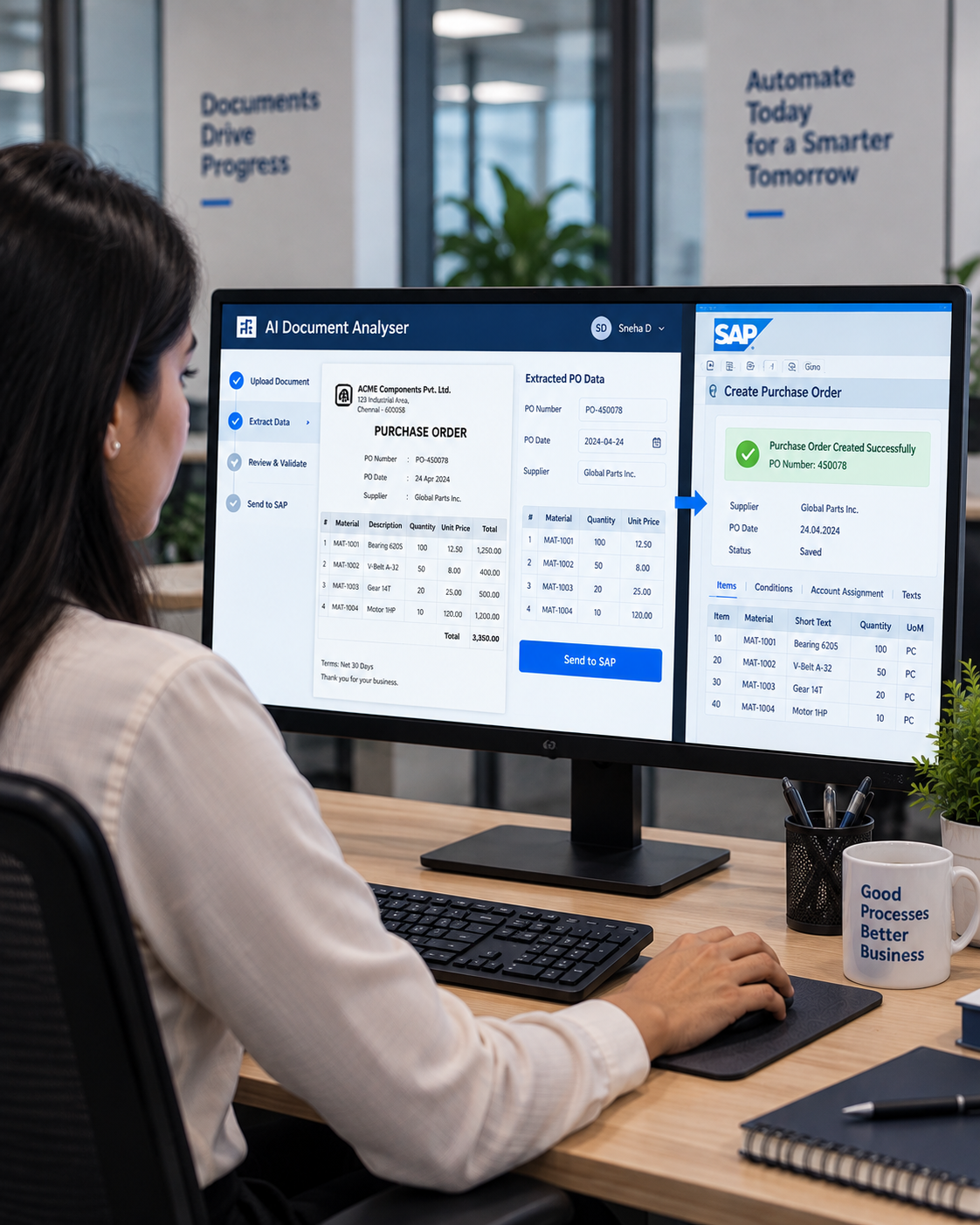
AI-powered document processing helps organizations reduce manual order-entry effort while improving the speed and accuracy of purchase order processing. From handling different PO formats and multiple line items to SAP workflows and process visibility, every stage supports a more efficient order-processing experience.
Operator using the E-Kanban digital material request system

Faster Order Processing

Process large purchase orders in a fraction of the time required for manual data entry.

Improved Data Accuracy

Reduce repetitive manual typing and minimize data-entry errors throughout the order-processing workflow.

Flexible PO and Line-Item Processing

Support different customer PO formats while automatically extracting structured information from multiple line items.

Seamless SAP Workflow Integration

Move validated order information into the SAP order-processing workflow for further processing.

Human Verification and Notifications

Allow users to review and confirm data while keeping responsible teams informed through email notifications.

Better Processing Visibility

Use reports, audit logs, and error reports to monitor document processing activities and identify issues.


Our Trusted Clients

We’re proud to collaborate with industry leaders and innovative companies

Luminous Power Technologies Logo
Schneider Electric Logo
Grundfos Logo
Gabriel India Logo
Bühler Group Logo
Dynamatic Technologies Logo
Priya Cement Logo
Collins Aerospace Logo
DRDO Logo
ISRO Logo
Tata Steel Logo
Fine Automation Logo
Sintex Logo
PM Technologies Logo
Continental Logo
AES Logo
SLZ Tech Automation India Logo
Harita Fehrer Logo
IFB Automotive Logo
Track TraceIT Logo
ABB Logo
Steel Strips Wheels Limited Logo
Resil Chemicals Logo
Indiana Logo
READY TO TRANSFORM YOUR DOCUMENT PROCESSING?

Turn Every Business Document into Structured, Actionable Data with AI

Experience intelligent document recognition, automated data extraction, validation, and seamless SAP-ready processing with our advanced AI Document Analyser.

AI Purchase Order Processing Software FAQ

AI Purchase Order Processing uses artificial intelligence and document recognition to extract structured information from customer purchase orders, including customer information, PO details and multiple line items.
Yes. The solution is designed to extract structured line-item information including part numbers, descriptions, quantities, prices, product codes, units, dates and taxes.
Yes. The solution includes a Part Number Master, which can be used as part of the item/product-code mapping process.
Yes. Customer-specific PO parsers can be configured for different customer purchase-order formats.
Yes. Email and PO attachment processing is included in the documented solution.
Yes. The solution includes an extraction verification/confirmation workflow and approval stage before SAP processing.
The reference solution includes SAP interface and testing. The documented implementation can provide structured data through Excel for SAP to pick up; the exact SAP integration mechanism can be configured according to the customer's SAP environment.