
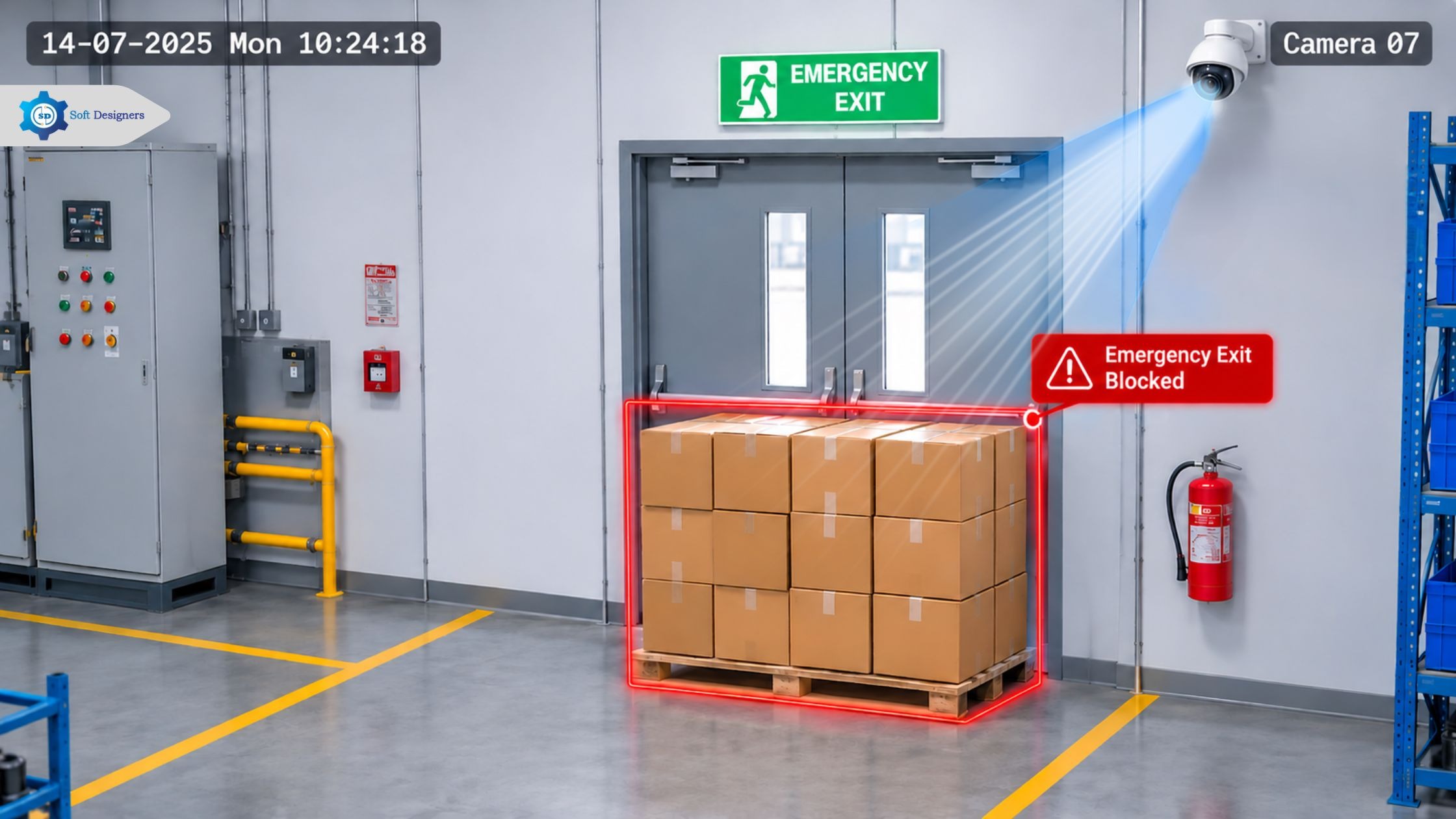
Introduction
Emergency exits, evacuation routes, walkways, and designated assembly areas are critical components of workplace safety in manufacturing plants. However, these areas can become obstructed by raw materials, finished goods, pallets, packaging boxes, trolleys, equipment, and other objects during daily production activities.
Even a temporary obstruction can delay evacuation during a fire, chemical leak, equipment failure, or other workplace emergency. When employees need to evacuate quickly, blocked emergency exits and restricted pathways can increase the risk of injuries, congestion, and serious accidents.
Emergency Obstacle Detection Software helps manufacturing companies proactively identify and resolve obstructions in critical safety areas using artificial intelligence (AI) and existing CCTV cameras. By continuously monitoring designated zones, the software detects objects blocking emergency exits, evacuation routes, walkways, and other restricted areas, enabling safety teams to respond before an emergency occurs.
What Is Emergency Obstacle Detection Software?
Emergency Obstacle Detection Software is an AI-powered workplace safety solution designed to identify objects obstructing emergency exits, evacuation pathways, designated walkways, and other safety-critical zones in industrial facilities.
The software uses video streams from compatible CCTV, IP, and RTSP cameras to monitor predefined areas. AI-based computer vision models analyze the camera feeds and identify potential obstructions based on configured zones and detection rules.
When an obstruction is detected, the system generates an alert and notifies the responsible safety personnel. The violation can then be assigned to the relevant department for investigation and resolution.
Unlike manual inspections that provide visibility only at specific points in time, automated camera-based monitoring can help safety teams identify obstructions throughout operating hours, subject to camera coverage, system availability, and configured monitoring rules.
Emergency obstacle detection software can monitor:
- Emergency exits: Identify objects blocking access to emergency exit doors and exit areas.
- Emergency evacuation routes: Detect materials, equipment, and other objects obstructing designated escape pathways.
- Factory walkways and aisles: Identify obstructions that restrict pedestrian movement.
- Fire safety equipment access: Monitor access areas around designated fire extinguishers, fire hose cabinets, and other emergency equipment.
- Assembly point access: Detects objects obstructing designated access routes to emergency assembly areas.
- Restricted safety zones: Identify objects placed in areas where storage or material placement is prohibited.
The objective is to help manufacturing organizations maintain clear access to critical safety areas and reduce the likelihood of accidents caused by obstructed pathways.
Why Is Emergency Obstacle Detection Important in Manufacturing Plants?
Manufacturing plants handle large quantities of materials and equipment. Production activities, material handling, maintenance, and temporary storage can unintentionally introduce obstructions into areas that must remain clear.
Manual inspections are important, but monitoring hundreds of exit doors, walkways, and safety zones across a large industrial facility can be challenging for a limited EHS team.
1. Prevent Blocked Emergency Exits
Emergency exits must remain accessible so employees can evacuate when required. Pallets, cartons, tools, and temporary storage materials can restrict access to exit doors.
AI-based emergency exit monitoring helps identify potential obstructions and notify safety personnel so they can arrange timely removal.
2. Maintain Clear Evacuation Routes
During an emergency, employees may need to move quickly through designated evacuation pathways. Objects left in these routes can create trip hazards, restrict movement, or contribute to congestion.
Emergency obstacle detection software helps safety teams monitor these pathways and identify potential obstructions before an evacuation is required.
3. Reduce Risks from Improper Material Storage
Production teams may temporarily place materials in walkways or near emergency exits when storage space is limited or production schedules are demanding.
By identifying repeated obstruction patterns, organizations can investigate why materials are being stored in unsuitable locations and improve material flow, storage practices, and workplace discipline.
4. Improve Safety Monitoring Across Large Facilities
Large factories may have multiple production buildings, warehouse areas, loading bays, emergency exits, and designated evacuation routes.
AI-powered monitoring can help safety teams review potential violations across multiple camera-monitored zones through a centralized application rather than relying exclusively on manual rounds.
5. Support Faster Corrective Action
Detecting an obstruction is only the first step. The issue must also be assigned, resolved, and verified.
When connected to an EHS management system, detected violations can be converted into corrective actions with assigned owners, target dates, status tracking, and closure evidence.
How AI-Powered Emergency Obstacle Detection Software Works
Soft Designers’ emergency obstacle detection solution can use existing compatible camera infrastructure and an on-premises GPU server to analyze video streams and communicate detected violations to the safety management application.
Step 1: Connect Existing CCTV Cameras
The solution can use compatible network CCTV cameras, IP cameras, and RTSP-enabled video sources already installed in the manufacturing plant.
Cameras are positioned to cover emergency exit doors, evacuation routes, designated walkways, fire safety equipment access areas, and other critical zones.
The quality of detection depends on camera placement, image resolution, lighting, visibility, and the characteristics of the configured AI model.
Step 2: Configure Safety-Critical Zones
Safety administrators define the areas that require continuous monitoring.
Examples include emergency exit access zones, marked pedestrian aisles, evacuation routes, and designated no-storage areas. Each zone can have its own monitoring rules and violation category.
Step 3: Analyze Video Streams Using AI
Camera streams are processed by AI-based computer vision models running on a centralized GPU server.
The models analyze the video to identify relevant objects and potential obstructions within configured zones. Detection rules can be customized to suit the layout and safety requirements of each manufacturing facility.
Step 4: Identify and Record Obstructions
When a potential obstruction is detected, the system records the relevant violation details, such as the camera, monitored zone, detection time, violation category, and supporting image, where configured.
This information helps safety personnel understand what was detected and where the issue occurred.
Step 5: Generate Real-Time Alerts
The system can notify designated personnel when configured obstruction conditions are detected.
Notifications can be delivered through email, mobile applications, SMS integrations, or Microsoft Teams, depending on the available integrations and alert configuration.
For critical violations, organizations can configure escalation rules to notify additional responsible personnel if the issue remains unresolved.
Step 6: Assign and Track Corrective Actions
Detected violations can be routed to the relevant department head, production supervisor, maintenance engineer, or warehouse team.
The assigned person can investigate the issue, remove the obstruction, provide closure evidence, and update the action status. Safety personnel can monitor pending, overdue, and completed actions through a centralized dashboard.
Step 7: Investigate Recurring Violations
If the same obstruction repeatedly occurs in a particular zone, the EHS team can use historical data to investigate the underlying cause.
For example, recurring blocked walkways may indicate insufficient storage space, poor material movement planning, inadequate housekeeping practices, or gaps in employee training.
Root cause analysis and corrective and preventive action (CAPA) workflows can help organizations address these underlying issues instead of repeatedly resolving the same obstruction.
Key Features of Emergency Obstacle Detection Software
AI-Based Obstruction Detection
Automatically analyze compatible camera feeds to identify potential obstructions in configured safety-critical zones. This helps reduce manual observation.
Emergency Exit Monitoring
Monitor designated emergency exit access areas and identify objects that may restrict access to exit doors.
Evacuation Route and Walkway Monitoring
Detect potential obstructions in factory aisles, pedestrian pathways, and designated evacuation routes to help maintain clear passage.
Multi-Camera Centralized Monitoring
Monitor multiple camera feeds across different production areas, warehouse zones, and plant buildings through a centralized GPU-based architecture.
Automated Safety Notifications
Send configured alerts to safety officers, supervisors, and responsible departments through supported communication channels.
Violation Classification
Classify detected issues by violation type, including emergency exit obstruction, walkway obstruction, evacuation route obstruction, and restricted-zone obstruction.
Zone-Wise Safety Analytics
Analyze violations by building, department, production line, camera, and monitored zone to identify areas that require additional attention.
Corrective Action Management
Create, assign, prioritize, track, and close actions associated with detected obstructions. Action workflows can include responsibility assignment, due dates, closure evidence, and escalation.
Root Cause Analysis and CAPA
Investigate repeated violations, document underlying causes, and establish corrective and preventive actions to reduce recurrence.
Historical Violation Reports
Maintain a historical record of detected violations and their resolution status to support trend analysis, management reviews, and internal safety audits.
Centralized Safety Dashboard
Display recent violations, pending actions, recurring issues, high-risk zones, and historical trends in a single application.
Hardware and Software Architecture
Emergency obstacle detection software can be deployed using a combination of existing cameras, on-premises AI processing infrastructure, and a centralized safety application.
The architecture can include the following components:
- CCTV and IP cameras: Capture video from emergency exits, walkways, evacuation routes, and other designated areas.
- Network connectivity: Transmit compatible camera streams to the AI processing server over the plant network.
- GPU-based AI server: Process video streams and run AI inference to identify configured obstruction conditions. An on-premises deployment allows video analysis to take place within the manufacturing facility.
- Safety management application: Receive detection events, display violation records, and support action assignment, escalation, reporting, and analytics.
- Notification services: Deliver configured alerts through supported email, SMS, mobile, or collaboration-platform integrations. Cloud-based notification delivery may be used when required and permitted by the organization’s network and security policies.
- Monitoring display and web portal: Provide safety teams and authorized managers with access to current violations, historical records, and action status.
For organizations operating multiple plants, the solution can be configured with a local GPU server at each facility and centralized or plant-specific reporting, depending on the required deployment architecture.
How Emergency Obstacle Detection Software Improves EHS Management
AI-based obstruction detection becomes more valuable when it is integrated into the organization’s wider EHS management processes.
Proactive Hazard Identification
The system helps identify potentially unsafe conditions before they contribute to an accident. Safety teams can prioritize critical obstructions and take action before an emergency occurs.
Automated Action Tracking
Instead of maintaining separate spreadsheets or relying exclusively on email communication, safety teams can track violations and corrective actions in a structured workflow.
Department-Wise Accountability
Each violation can be assigned to a responsible department or individual. This creates clearer ownership and makes it easier to follow up on unresolved issues.
Repeat Violation Analysis
Historical records help identify departments, zones, or violation categories where obstructions repeatedly occur. These insights can support targeted interventions.
Training and Behavioral Improvement
If recurring violations indicate gaps in housekeeping practices or material storage discipline, the organization can introduce targeted toolbox talks, awareness programs, or refresher training.
Safety Audit Support
Historical detection records, corrective action status, and closure evidence can support internal EHS inspections and audit preparation. The software complements physical inspections and establishes emergency preparedness procedures rather than replacing them.
KPIs to Measure Emergency Obstacle Detection Performance
Manufacturing organizations can use obstruction detection data to establish measurable safety improvement objectives.
| KPI | What It Measures |
|---|---|
| Total obstruction violations | Number of detected obstruction events during a selected period |
| Emergency exit obstruction count | Number of recorded violations associated with emergency exit access areas |
| Average resolution time | Average time taken to resolve detected obstruction issues |
| Corrective action closure rate | Percentage of assigned actions closed within the selected reporting period |
| Repeat violation rate | Frequency of recurring violations in the same zones or categories |
| Overdue corrective actions | Number of actions that remain unresolved beyond their due dates |
| Zone-wise violation count | Distribution of obstructions across monitored areas |
| Department-wise violations | Distribution of recorded violations by responsible department |
| Detection precision | Proportion of system detections confirmed as genuine violations during validation |
| Camera monitoring availability | Percentage of planned monitoring time during which the relevant camera and processing system are available |
These KPIs can be reviewed weekly or monthly to understand performance and identify opportunities for improvement. Where possible, organizations should establish baseline values before introducing the solution and measure changes over time.
Industry Applications of Emergency Obstacle Detection Software
Although emergency obstacle detection is especially useful in manufacturing, the same principles can be applied to other facilities where clear evacuation routes and emergency access are important.
Manufacturing and Automotive Plants
Monitor production aisles, assembly areas, material handling routes, emergency exits, and designated evacuation pathways.
Warehouses and Logistics Facilities
Identify pallets, cartons, containers, and handling equipment obstructing pedestrian routes or emergency access areas.
Pharmaceutical and Food Processing Facilities
Monitor designated safety pathways and emergency access zones while supporting site-specific housekeeping and operational requirements.
Oil, Gas, and Chemical Facilities
Monitor selected emergency access areas and designated evacuation routes in facilities where unobstructed access is particularly important.
Hospitals and Healthcare Facilities
Help identify objects obstructing designated emergency routes, corridor access, and other monitored areas.
Airports, Shopping Malls, Stadiums, and Public Venues
Support monitoring of selected evacuation routes and emergency access areas across large facilities with multiple monitored zones.
The detection rules, camera coverage, and alert priorities should be configured according to the hazards, operating conditions, and evacuation arrangements of each facility.
Emergency Obstacle Detection Software and Workplace Safety Compliance
Maintaining accessible emergency exits and safe evacuation routes is an important part of workplace safety and emergency preparedness.
Organizations may refer to applicable occupational safety regulations, fire safety requirements, building codes, and their internal emergency response procedures when establishing monitoring requirements.
In the United States, OSHA requirements include provisions relating to exit routes, including maintaining exit routes free and unobstructed. ISO 45001 provides a framework for occupational health and safety management, including the management of operational risks and emergency preparedness.
AI-based emergency obstacle detection can support these programs by providing additional monitoring, documented observations, and corrective action records. However, the software does not independently establish regulatory compliance or replace required inspections, emergency drills, evacuation planning, or other safety controls.
Why Choose Soft Designers for Emergency Obstacle Detection?
Soft Designers helps industrial organizations connect AI-powered safety monitoring with structured EHS workflows.
The emergency obstacle detection solution is designed to help safety teams identify potential obstructions, receive timely notifications, assign corrective actions, and analyze recurring violations through a centralized application.
Key capabilities include:
- Integration with compatible existing CCTV, IP, and RTSP cameras.
- AI-based video analysis using a GPU-powered processing architecture.
- Configurable monitoring zones for emergency exits, evacuation routes, and walkways.
- Centralized violation monitoring and historical reporting.
- Email and other supported notification integrations.
- Corrective action tracking and escalation workflows.
- Root cause analysis and CAPA support for recurring violations.
- Zone-wise, department-wise, and time-based safety analytics.
- Deployment options designed around plant infrastructure and operational requirements.
By combining automated detection with action management and safety analytics, Soft Designers helps organizations move toward a more proactive approach to workplace safety.
Conclusion
Blocked emergency exits and obstructed evacuation routes can create serious safety risks in manufacturing plants and other industrial facilities. As factories expand and material movement becomes more complex, maintaining visibility across all critical access areas becomes increasingly challenging.
Emergency Obstacle Detection Software helps address this challenge through AI-powered camera monitoring, automated violation alerts, zone-wise analytics, and corrective action management. By combining existing camera infrastructure with centralized AI processing and EHS workflows, organizations can identify potential obstructions, improve accountability, and investigate recurring safety issues.
Contact Soft Designers to explore how AI-based emergency exit and walkway monitoring can be configured for your manufacturing facility.