Incident Reporting Software for Compliance & Safety

Digital Incident Reporting Software for the Construction Industry

Our Trusted Clients

We’re proud to collaborate with industry leaders and innovative companies

Why Choose Our AI-Driven Incident Tracking Software

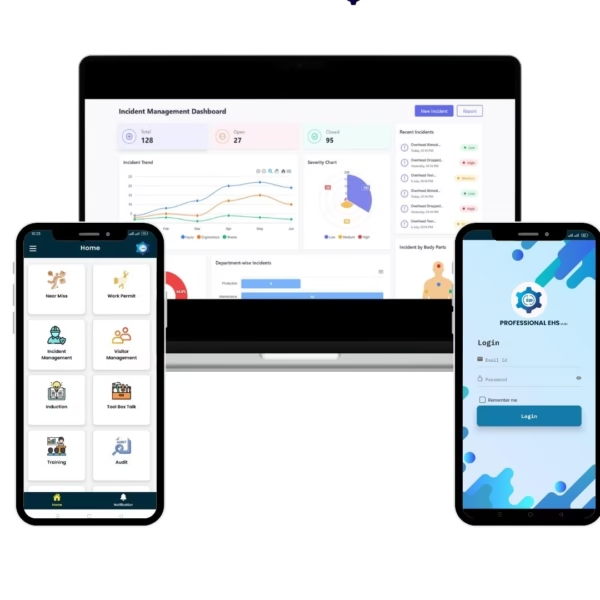
Real-Time Monitoring

Track and resolve incidents instantly with AI-powered alerts and escalations.

AI Root Cause Analysis

Use AI tools like 5 Whys and Fishbone analysis to prevent recurring incidents.

Customizable Dashboards

Visual dashboards and KPIs provide real-time insights for better decisions.

Seamless Compliance

Automate reporting and stay compliant with safety and regulatory standards.

Mobile-Friendly Access

Log and manage incidents anytime with a responsive mobile interface.

Scalable & Flexible

Adaptable for small teams to large enterprises with flexible configurations.

Incident reporting software

Key Features & Benefits

Incident Tracking System

  • Quickly record and classify incidents by type, location, or severity for organized tracking.
  • Instantly alert supervisors and safety teams to ensure rapid response.
  • Use AI-powered 5 Whys and Fishbone tools to uncover and eliminate root causes.
  • Assign, track, and verify corrective actions to prevent repeat incidents.
  • Generate OSHA 300, 300A, and 301 reports with built-in compliance templates.
  • Monitor real-time incident trends with interactive dashboards and performance metrics
Incident Reporting Software Process Flow

Incident Reporting Software Process Flow

Report Incident
Employees log incidents in real-time using the web or mobile platform. The system captures essential details—incident type, description, location, date/time, and involved parties—ensuring immediate digital documentation.
Notify & Escalate
Automated alerts are instantly sent to supervisors, safety teams, and relevant stakeholders. The system escalates critical incidents based on severity, location, or predefined rules, ensuring rapid response and accountability.
Categorize & Review
Incidents are classified by type (e.g., injury, near miss, hazard), site, and severity. Administrators or safety officers review the details, confirm categorization, and trigger the appropriate workflow for further action.
Investigate & Root Cause Analysis
The safety team conducts a thorough investigation using methodologies like 5 Whys or Fishbone analysis. Evidence, witness statements, and photos are collected and documented within the system for transparency and compliance.
Corrective & Preventive Actions (CAPA)
Based on root cause findings, corrective and preventive actions are identified, assigned to responsible parties, and tracked through to completion. The system provides automated reminders, status updates, and escalation for overdue tasks.
Action Taken
Corrective and preventive measures are implemented at the site. The system records actions taken, supporting documentation, and verification steps to ensure effectiveness and prevent recurrence.
Close & Report
Once all actions are verified and approvals are obtained, the incident is formally closed. Compliance forms, reports, and KPIs (e.g., time to close, recurrence rates) are generated for audits, management review, and continuous improvement.

Case study

EHS Management Software - Digital permit to work

A leading manufacturing company Luminous reduced permit approval time by hour to minute and achieved 70% improvement in safety compliance after implementing SoftDesigners’ PTW Software.

By moving from paper-based permits to a digital system with AI safety checks, they not only improved compliance but also empowered employees with mobile access to permits anytime, anywhere.

See how leading manufacturers improved safety with Soft Designers

Industries We Serve

Ready to Transform Your Incident Reporting Process?

Experience streamlined reporting, enhanced workplace safety, and real-time control with our Incident Reporting Software.

Incident Tracking Software – FAQ

What is Incident Tracking Software?
Incident Tracking Software is a digital system used to record, manage, investigate, and analyze workplace incidents, near misses, injuries, and unsafe conditions. It helps organizations capture incidents in real time, identify root causes, implement corrective actions, and prevent future occurrences while maintaining a centralized safety record.
Why do companies need Incident Tracking Software?
Companies need Incident Tracking Software to improve workplace safety, reduce injuries, ensure regulatory compliance, and gain visibility into safety risks. It replaces manual reporting with automated workflows, speeds up investigations, improves accountability, and supports data-driven decisions to minimize operational and safety risks.
Can the software be customized for my industry?
Yes. The software can be customized to meet the specific needs of different industries such as manufacturing, construction, oil & gas, power, chemicals, logistics, and more. Custom workflows, forms, risk categories, compliance requirements, and dashboards can be configured based on industry standards and organizational processes.
How does AI improve incident tracking?
AI enhances incident tracking by identifying patterns, predicting potential risks, automating root cause analysis, and highlighting recurring hazards. AI-driven insights help safety teams move from reactive reporting to proactive prevention, reducing future incidents and improving overall safety performance.
Is the software mobile-friendly?
Yes. The software is fully mobile-friendly and can be accessed on smartphones and tablets. This allows employees to report incidents instantly from the field, upload photos or evidence, and complete investigations anytime, anywhere—ensuring faster reporting and response.
How does it help with compliance and audits?
Incident Tracking Software supports compliance by maintaining complete incident records, investigation reports, corrective actions, and audit trails. It simplifies regulatory reporting, ensures adherence to safety standards, and provides instant access to data during internal or external audits.
How do I get started?
Getting started is simple. You can request a demo or contact the team to assess your safety requirements. The implementation process includes configuration, user training, data migration (if required), and ongoing support to ensure a smooth rollout and maximum value from the system.