
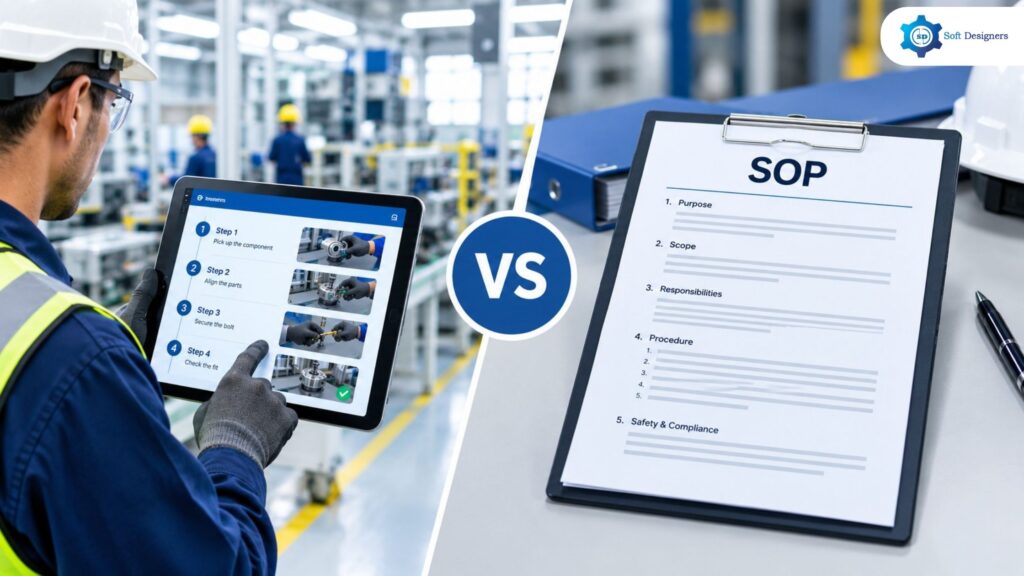
Many manufacturing facilities have established procedures in place, but variations in task execution can still occur between shifts. This often happens not because procedures are unavailable, but because employees may struggle to access and apply the relevant instructions while carrying out their daily tasks. This is the practical question behind digital work instructions vs SOP, one defines what the organisation has approved, while the other shapes how a specific task is carried out at the workstation.
A Standard Operating Procedure (SOP) records the approved method, responsibilities, safety precautions, and quality requirements for a process.Digital work instructions divide a process into clearly defined steps, using an organized sequence of visual and written guidance to help operators complete each task accurately. The two are not rivals. Treating them as interchangeable, however, produces documents that are either too broad to guide an operator or too narrow to govern a process.
What Is a Standard Operating Procedure in Manufacturing?
A Standard Operating Procedure (SOP) establishes the approved method for carrying out a specific manufacturing process. It outlines the required practices, operating conditions, and control measures that employees must follow to maintain consistent production, meet quality standards, and comply with safety and regulatory requirements.
Core Capabilities
Standard Operating Procedures (SOPs) establish documented methods for carrying out recurring activities in a consistent and controlled manner. Their key capabilities include:
- Process Documentation: Records the prescribed approach for performing a manufacturing activity, covering the necessary actions, work methods, and operating conditions.
- Consistent Process Execution: Helps employees follow the same approved methods across different shifts, teams, and production activities.
- Document Control: Supports the review, approval, revision, and distribution of procedures to ensure employees refer to current versions.
- Training and Reference: Provides employees with a documented resource for learning processes and checking the correct way to perform activities.
- Regulatory and Internal Compliance: Documents the procedures required to meet applicable standards, regulations, and organizational policies.
- Process Review and Improvement: Enables organizations to review existing procedures and update them when processes, equipment, or requirements change.
SOP in Manufacturing: Practical Applications
SOPs support consistent operations by outlining who is responsible for each activity, how procedures are authorized, and which records must be maintained when tasks are handed over between shifts or teams. Typical applications include:
- Machine start-up and shutdown: defined sequences and safety precautions.
- Incoming Inspection and Calibration Control: describes how to maintain measurement accuracy and material quality by evaluating incoming goods, calibrating measuring equipment, and documenting findings.
- Non-conforming product handling: responsibilities and disposition.
- Regulated sectors: audit and certification support in aerospace, automotive, and pharmaceuticals, since SOPs show that approved controls existed before production began.
What Are Digital Work Instructions?
A Digital Work Instruction delivers task-specific guidance to operators through an ordered set of instructions displayed on devices such as tablets, workstation screens, or machine interfaces, helping them carry out each operation correctly. Where an SOP states the approved procedure, a digital work instruction converts it into actionable guidance for one operation, at one station, for one product or variant.
Core Capabilities
Depending on the software and its configuration, a digital work instruction can provide:
- Visual guidance: photographs, short videos, and 3D models with step-by-step navigation.
- Sequence Control: guides operators through the required steps in the correct order, with progression controls where supported by the software.
- Quality checks: a check is required before the operator moves ahead.
- Data capture: measurements, and a record of who completed each task and when.
- Multilingual presentation: operators read instructions in their preferred language.
- Revision control: approved changes reach every workstation, so outdated copies do not linger.
- Traceability: Captures time-stamped task records that can associate completed work with the responsible operator and the applicable instruction version, depending on the software’s capabilities.
Manufacturers should assess available features according to their shop-floor workflows, production objectives, and particular business demands because digital work instruction systems offer a variety of capabilities. These instructions can also support employee training and provide experienced operators with a readily accessible reference during routine production.
Digital Work Instructions in Manufacturing: Practical Applications
Digital work instructions in manufacturing are most useful where tasks are repetitive, variant-driven, or error-sensitive. Typical applications include:
- Assembly Stations: Use diagrams and images to help workers identify the correct placement and alignment of parts during assembly.
- Fastening Operations: Display the required torque values to guarantee accurate tightening
- Inspection Checkpoints: Allow operators to document inspection findings and detect quality issues before the product proceeds to the next stage of production.
- Operator Training and Rotation: Employees are able to acquire new skills and exchange workstations while ensuring that they comply with standard operating procedures through operator training and rotation.
- Product Changeovers: Display the instructions relevant to the specific product variant being manufactured, helping operators follow the correct procedure for each changeover.
- New Product Introduction: Allows work instructions to be reviewed and verified at the workstation before they are approved for production use.
- Supervision: Gives managers the tools they need to assist workers throughout production, respond to enquiries about tasks, and promote adherence to set work procedures.
Digital Work Instructions vs SOP: Key Differences
SOPs and Digital Work Instructions both promote consistent production practices, but they serve different purposes depending on the process requirements, users, and level of guidance needed during execution.The comparison below summarises the distinctions.
| Comparison Factor | Standard Operating Procedure (SOP) | Digital Work Instructions |
|---|---|---|
| Primary Purpose | Defines approved procedures, responsibilities, and process controls. | Converts approved procedures into actionable, task-specific guidance. |
| Scope | Covers an overall process or function. | Focuses on individual operations, workstations, and product variants. |
| Level of Detail | Explains responsibilities, precautions, and quality requirements. | Provides detailed, step-by-step actions, visuals, parameters, and checkpoints. |
| Format | Available as paper documents or electronic files. | Interactive, screen-based instructions with images, videos, and 3D models. |
| Shop-Floor Guidance | Usually consulted as a reference during work. | Guides operators through each step while performing the task. |
| Visual Guidance | May include supporting images and diagrams. | Integrates task-specific visuals directly into the work sequence. |
| Step Sequence | Defines the approved process sequence. | Can enforce the required step order through guided navigation. |
| Quality Checks | Defines inspection requirements and acceptance criteria. | Can require operators to complete quality checks before proceeding. |
| Process Parameters | Documents approved limits and operating requirements. | Displays task-specific parameters, such as torque values, at the relevant step. |
| Complex Operations | Establishes the governing procedure for complex processes. | Breaks lengthy operations into manageable steps, reducing reliance on memory. |
| Product Variants | Documents the applicable process and controls. | Can display only the instructions relevant to the selected product variant. |
| Operator Training | Provides the approved procedure for learning and reference. | Offers visual, step-by-step guidance for faster familiarisation with tasks. |
| Operator Rotation | Provides a consistent reference across roles and stations. | Helps operators adapt to different stations by presenting the relevant instructions. |
| First Time Right (FTR) | Establishes quality requirements to be followed. | Supports FTR by placing verification checkpoints within the task sequence. |
| Error Prevention | Defines precautions and corrective actions. | Can help prevent skipped steps and missed checks through guided sequences and mandatory checkpoints. |
| Quality Inspection Records | Defines required records and inspection methods. | Can capture inspection results and task-level completion records when configured. |
| Revision Control | Uses formal document control and approval procedures. | Can publish approved revisions to workstations, reducing the risk of outdated instructions being used. |
| Traceability | Maintains document revisions, approvals, and required process records. | Can link task completion to the operator, timestamp, and instruction revision. |
| Language Accessibility | Depends on the available document translations. | Can present instructions in multiple languages, depending on software capabilities. |
| Engineering Changes | Requires controlled revision and distribution of updated procedures. | Can distribute approved instruction updates to relevant workstations through a publishing workflow. |
| AI-Assisted Conversion | Serves as a source document for digitisation. | Some platforms can use AI to create structured drafts from existing SOPs and PDFs, subject to technical review and approval. |
| Data Collection | Specifies what information must be recorded. | Can capture measurements, operator inputs, and completion data digitally. |
| Best Suited For | Process governance, responsibilities, compliance, and audit requirements. | Repetitive, variant-driven, lengthy, or error-sensitive shop-floor operations. |
An SOP defines the authorized process and assigned responsibilities, while a digital work instruction guides the operator through the actions required at each stage. Confusion arises when a single document is expected to do both. A long SOP pushed to the shop floor tends to be skimmed or ignored, while a collection of task instructions with no governing procedure leaves responsibilities and controls undefined.
How to Decide Which Approach to Use
The decision is rarely either-or. Most plants need both, and the useful question is where the weight of effort should fall for each process. Several factors guide the choice.
- Task Complexity: Operations involving intricate sequences, precise tolerances, or exact tightening specifications often require detailed, step-by-step guidance.
- Product variants: stations handling multiple variants gain from instructions that present only the steps relevant to the variant in hand.
- Consequence of error: where an omitted step leads to rework, field failure, or safety exposure, enforced checkpoints add value.
- Operator turnover and rotation: frequent movement between stations raises the cost of relying on memory.
- Regulatory and Audit Requirements: Processes subject to customer audits or regulatory checks require controlled documentation and traceable evidence of compliance.
- Frequency of change: where engineering changes are common, controlled publishing prevents outdated copies from lingering at stations.
Not every process requires digital guidance. A well-maintained standard operating procedure (SOP) may be sufficient to accommodate a low-frequency activity, such as an annual calibration review. In contrast, a digital work instruction is a viable option for a final assembly station that operates five variants across three schedules.
Start with stations that exhibit the most defects, rework, or training delays, and then expand to other areas once the approach has been validated. This is a logical sequence. Pilot stations also reveal practical details early, such as screen placement, glove-friendly interaction, lighting, and how operators respond to enforced checkpoints, which are difficult to predict from documents alone.
Conclusion: Using Both Approaches Together
The difference between digital work instructions vs SOP comes down to function. An SOP governs the process by fixing what is approved and who is accountable. In the form of plain, sequenced, and checkable guidance, a digital work instruction communicates that sanction to the workstation. Weakness in either layer shows up as variation, rework, or audit findings.
For manufacturing units evaluating digital work instruction software, the practical starting point is not a feature comparison but a review of existing procedures: which are well governed but poorly executed, and where operator errors cluster. Those stations are where structured guidance, enforced checkpoints, and approval-controlled updates deliver the clearest benefit.
Engineering should continue to approve procedures, qualified individuals should review guidance, and supervision should remain active. Periodic audits of both layers, comparing what the SOP states, what the instruction displays, and what operators actually do, keep the two aligned as products and equipment change. Together, SOPs and digital work instructions provide the standardized processes needed to support Industry 4.0 manufacturing.
Looking to digitize your shop-floor processes? Soft Designers offers Digital Work Instruction Software to help manufacturers deliver clear, consistent, and easy-to-follow work instructions.