
Introduction: Why Operator Errors Occur on the Shop Floor
Operator errors rarely happen because someone is careless. In most plants, the root cause sits somewhere in how instructions are written, delivered, and followed at the workstation. A step gets skipped because the operator was interrupted mid-task. A component is installed in the wrong orientation because the diagram was too small to read clearly. A torque value is recorded incorrectly because the paper log was filled out from memory at the end of the shift rather than at the moment the reading was taken. Digital Work Instruction exists precisely to close these small, everyday gaps that traditional paper-based procedures were never built to handle.
Anyone who has spent time walking a production line knows the usual suspects behind recurring mistakes: missed steps, incorrect sequencing, unclear or outdated procedures, overlooked quality checks, measurement errors, language barriers, dependence on memory, wrong component identification, and inconsistent interpretation of the same written procedure by different operators. A printed work instruction, however well written, cannot adapt to any of this. It sits in a binder or is taped to a fixture, it does not update itself when a process changes, and it cannot verify whether a required check was actually performed before the operator moved to the next stage. Digital work instructions address this by placing structured, current, and verifiable guidance directly at the point of work, rather than leaving accuracy to memory or interpretation.
Common Shop-Floor Error | Why It Happens | Digital Work Instruction Response | Expected Process Benefit |
Skipped process step | Reliance on memory or a rushed pace | Guided, sequential steps shown one at a time | Fewer incomplete operations |
Wrong work sequence | Operator improvises order under pressure | Next/Previous guided navigation | Consistent, correct sequencing |
Misread written instruction | Text-only procedure open to interpretation | Photos, videos, and 3D models | Reduced misinterpretation |
Missed quality check | No enforced stopping point | Mandatory checks before progression | Fewer defects reaching the next stage |
Using an outdated procedure | Printed copies not withdrawn after revision | Automatic instruction updates at every workstation | Reduced procedure-related mistakes |
1. Digital Work Instruction Provides Clear Step-by-Step Guidance
A long, dense procedure document asks an operator to hold too much in mind at once. When a task involves fifteen or twenty micro-actions bundled into two or three paragraphs, it becomes easy to lose track of where one action ends and the next begins. Breaking a complex procedure down into individual, clearly sequenced steps changes this. Each screen or card presents one action, so attention stays on the task actually being performed rather than on scanning ahead or trying to remember what came earlier.
This is the practical idea behind one clear step at a time: instead of interpreting a whole page of instructions before starting, the operator completes a single defined action, confirms it, and only then moves forward. Standardized digital instructions reduce the room for skipped or incomplete actions because nothing beyond the current step competes for attention.
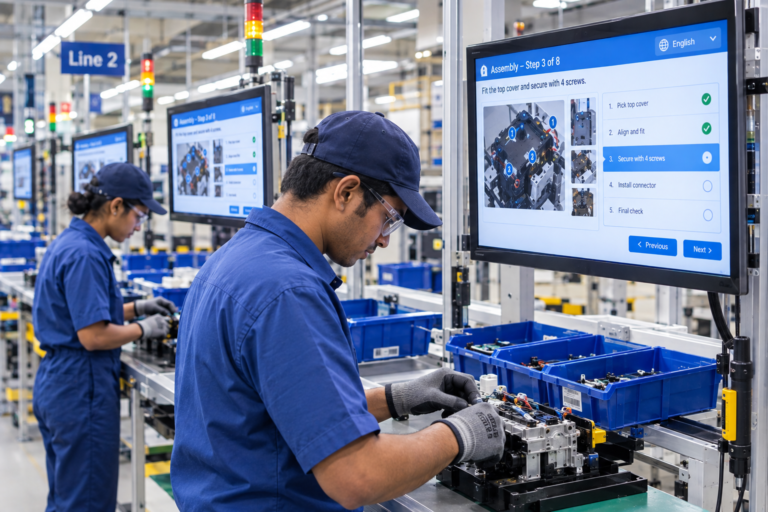
There is also a productivity angle that is often overlooked. Operator productivity is not simply a measure of how fast a task gets done; it is closely tied to how much time is lost to friction around the task itself. Clear, structured instructions can reduce time spent:
- Searching for the correct version of a procedure
- Interpreting ambiguous or poorly worded steps
- Asking a supervisor for repeated clarification
- Correcting mistakes that could have been avoided
- Reworking a task because a step was missed the first time
When execution is correct the first time, the cycle time for that task naturally shortens. Productivity gains, in this sense, are a byproduct of accuracy rather than a separate initiative.
2. Guides Operators Through the Correct Work Sequence
Sequence errors are a distinct category of mistake from skipped steps, though the two are often confused. A sequence error happens when every required action is technically performed, but in the wrong order: a fastener tightened before an alignment check, or a coating applied before a surface preparation step is complete. These errors are particularly frustrating because the operator was not being careless; the procedure simply did not make the correct order obvious enough.
Guided workflow navigation addresses this directly. Rather than presenting an entire task list and trusting the operator to work through it correctly, the workflow shows only the next required action, using simple Next and Previous navigation to move through the process. The operator cannot easily jump ahead or fall back on assumption about what should happen next, because the interface itself is defining the sequence.
Correct sequence → fewer procedural mistakes.
This relationship becomes especially important on lines that handle several product variants, where the correct order of operations may differ slightly from one variant to the next. A guided digital sequence removes the burden of remembering which variant requires which order, since the workflow itself reflects the approved process for whatever is currently being built.
3. Makes Complex Tasks Easier to Understand With Visual Instructions
Written instructions describe what should happen; they do not always show how it should look while it is happening. A sentence such as “align bracket to reference mark before securing” can be interpreted several different ways depending on the operator’s experience level, especially during hands-on work where there is little time to stop and re-read a paragraph. This is the difference between reading what to do and seeing how it should be done.
Photographs, videos, and other visual work guidance close that gap. A photograph of the correct bracket alignment removes ambiguity that a sentence alone cannot. A short video of a torque sequence shows pacing and hand position that would take several sentences to describe, and likely still leave room for misunderstanding. Visual instructions reduce the mental translation step between reading a description and performing an action, which is often where errors creep in.
Related to this is a broader manufacturing concept worth mentioning even though it is not confirmed as a built-in capability of every digital work instruction platform: Pick-to-Light systems. Where such systems are integrated into a facility, illuminated indicators at picking locations provide visual confirmation of the correct component or bin before the operator continues. This directly supports component identification and reduces wrong-part selection and picking mistakes. It should be treated as a complementary shop-floor concept rather than assumed to be a standard feature of every digital work instruction solution; whether it is available depends on the specific platform and its integration options.
4. Uses 3D Models to Reduce Visual Errors

Some components are genuinely difficult to describe with a photograph alone, particularly parts with orientation-dependent features, internal geometry, or multiple similar-looking variants. Interactive 3D models allow an operator to view a component from angles that a static photo cannot provide, which matters most when assembly errors are caused by getting orientation or positioning wrong rather than by missing a step entirely.
Interactive 3D work instructions support this by letting operators rotate and inspect a model before or during assembly, helping clarify:
- Correct component orientation
- Positioning relative to adjacent parts
- Assembly relationships between multiple components
- Geometry on complex or unfamiliar parts
3D models work best alongside photographs, videos, and written text rather than replacing them. A written step explains what to do, a photo confirms the expected end result, and a 3D model resolves any remaining ambiguity about spatial orientation. Used together, these formats specifically target visual and assembly-related errors that text-only procedures tend to leave unresolved.
5. Highlighting Critical Details for Visual Accuracy
Even a well-chosen photograph or 3D view can present too much information at once. When an image shows an entire subassembly, a specific detail an operator actually needs to notice (a small locating pin, a particular fastener among several similar ones, a connector that must not be reversed) can be easy to overlook simply because it is one small element within a larger picture.
Directing attention to the exact area that matters, rather than leaving the operator to scan an entire image, supports better visual accuracy. When critical details are made visually obvious within an instruction, the sequence of attention → visual accuracy → correct interpretation holds together: the operator’s focus goes to the right location, the correct detail is seen clearly, and the resulting action is more likely to match what the procedure intended. This is particularly useful in assemblies with several visually similar components, where a general instruction to “install the correct part” is not enough on its own; the operator needs to see specifically which one.
6. Keeps Operators on the Latest Approved Instructions
Printed instructions create a quiet but persistent risk: once a process changes, every existing paper copy on the floor is technically obsolete until someone physically finds and replaces it. In practice, outdated copies often linger at workstations for days or weeks after a revision, particularly across multiple shifts or plants, simply because updating paper documentation is a manual and easily forgotten task.
Automatic work instruction updates remove this dependency. When a supervisor or process engineer revises and approves a work instruction, workstations receive the updated version without requiring anyone to physically distribute or replace anything. Version control ensures that only the current, approved revision is available to operators, while earlier versions remain accessible for reference or audit purposes rather than being left in circulation on the floor.
This matters directly for error reduction because a correctly designed procedure only prevents mistakes if operators are actually following it. An operator working from a superseded instruction is, by definition, working from the wrong process, regardless of how carefully the outdated document is followed.
7. Reduces Errors Through Mandatory Quality Checks
Quality checks that depend entirely on an operator remembering to perform them are inherently fragile, especially at the end of a long shift or during a high-pressure production run. Mandatory quality checks change this by requiring verification (a pass/fail confirmation, a measurement entry, or a checklist-based inspection) before the operator is able to move to the next step in the workflow.
Digital checklists placed directly inside the workflow function differently from a standalone paper checklist. Rather than being a separate document that can be filled in later or skipped under time pressure, the checklist becomes a required stopping point within the guided sequence itself. This structure specifically targets:
- Skipped inspections that would otherwise go unnoticed until a later stage
- Incomplete checks where only part of a checklist gets filled in
- Forgotten verification points during rushed production
- Inconsistent manual recording between different operators or shifts
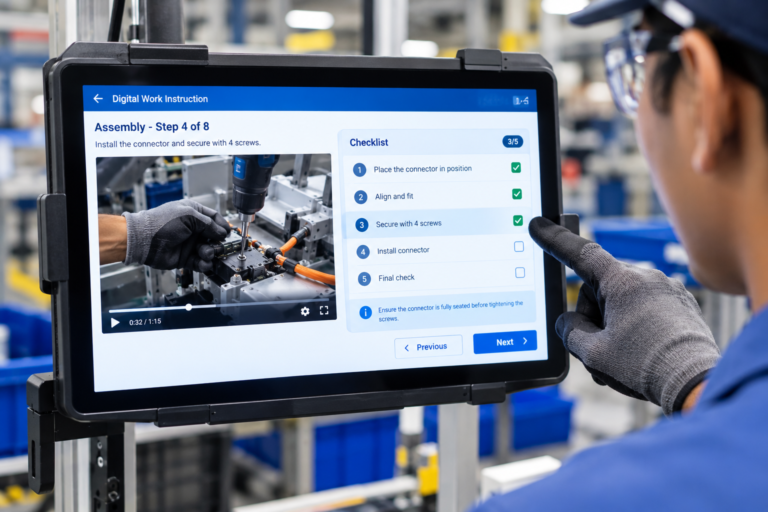
Poka-Yoke, the well-established mistake-proofing principle in manufacturing, is a useful lens for understanding what digital work instruction contributes here. Poka-Yoke is fundamentally about designing a process so that errors are difficult or impossible to make in the first place, often through physical fixtures, sensors, or jigs. Digital work instruction does not replace physical Poka-Yoke mechanisms, but it can support the same underlying principle through a digital layer: defined process steps that cannot be skipped, mandatory checks that must be completed, enforced correct sequence, and verification required before the operator is allowed to progress. The physical mechanism and the digital layer address the same problem from different angles, and in many plants they work best together rather than as substitutes for one another.
This structure also connects to First-Time-Right (FTR) performance. The logic runs in a straightforward line: a clear instruction supports correct execution, correct execution is confirmed through verification, and fewer avoidable mistakes or instances of rework follow as a result. None of this guarantees a specific improvement percentage, and digital work instruction does not eliminate rework entirely, since process variation, material issues, and equipment condition all still play a role. What can reasonably be said is that removing ambiguity and enforcing verification gives operators a stronger foundation for getting the task right on the first attempt.
8. Reduces Measurement-Related Errors With Digital Data Capture
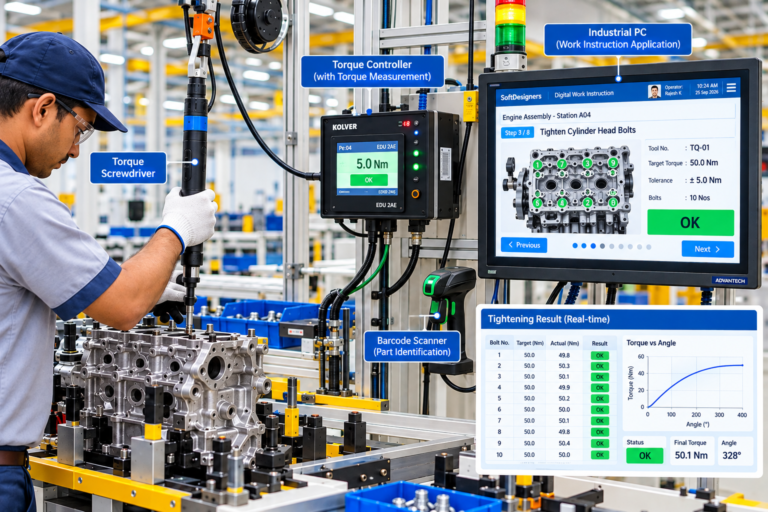
Manual recording of measurements introduces its own category of error, separate from the assembly task itself. A torque value read correctly off a gauge can still be transcribed incorrectly onto a paper log, entered into the wrong field, or left blank entirely if the operator is interrupted before writing it down. These are not process failures in the traditional sense, since the physical work may have been done correctly, but the record of it is wrong or missing, which creates problems later during quality review or a deviation investigation.
Digital data capture reduces this risk by recording measurement values directly as part of the workflow rather than relying on a separate handwritten log. Where measurement devices such as torque tools, gauges, and inspection equipment are integrated, for example through RS-232 or Modbus TCP/RTU connections, readings can be captured automatically at the point of measurement, removing the manual transcription step where errors most often occur.
This connects closely to traceability. A digital process record can capture information such as completed steps, verification status, measurement values, inspection results, and the operator and workstation involved in each stage. This kind of record supports several downstream needs:
- Process verification during internal review
- Quality review of a specific batch or work order
- Deviation investigation when a problem is identified later
- Identifying precisely where in the process an issue occurred
None of this should be read as a regulatory or compliance guarantee; what digital traceability provides is a more complete and accurate record than a manual system typically produces, which makes root-cause work considerably faster when something does go wrong.
Capability | What the Operator Sees/Does | Error It Can Help Address |
Step-by-step instructions | Completes one action at a time in sequence | Skipped or incomplete steps |
Visual instructions (photo/video) | Compares actual work to a reference image | Misread or misinterpreted procedure |
Interactive 3D models | Rotates a model to check orientation | Wrong orientation or assembly errors |
Mandatory quality checks | Confirms pass/fail or enters a measurement before continuing | Skipped or forgotten verification |
AI-powered translation | Reads instructions in a familiar language | Language-related misunderstanding |
AI visual inspection | Assembly is checked by camera after completion | Visible assembly defects missed manually |
9. Reduces Language Barriers With Multilingual Translation
On many shop floors, the workforce speaks several different first languages, and a technical procedure written in one language is not equally accessible to everyone reading it. Even operators with reasonable working fluency can misread specific technical terms, safety-critical wording, or precise quantities when instructions are not in a language they are most comfortable with, and that gap becomes a direct source of execution errors.
AI-powered translation addresses this by making the same work instruction available in multiple languages without requiring a manual re-write of the procedure for each one. This does not mean translations are assumed to be perfect on first output: machine translation of technical manufacturing language can still misrepresent nuance, particularly around specialized terminology. Reviewing and editing translated instructions for accuracy remains an important step before publishing them for operator use, and this review capability is part of how the translation process is intended to function rather than an afterthought.
Language barrier → better understanding → more accurate execution.
The value here is straightforward: an instruction that is genuinely understood is far more likely to be followed correctly than one that is technically present but only partially comprehended.
10. Uses AI Visual Inspection to Identify Errors During Execution
It is worth being precise about where Digital Work Instruction ends and AI visual inspection begins, because the two serve different purposes. Digital Work Instruction provides guidance on how a task should be performed. AI visual inspection helps check whether the resulting assembly or product actually meets the expected condition once the task is complete.
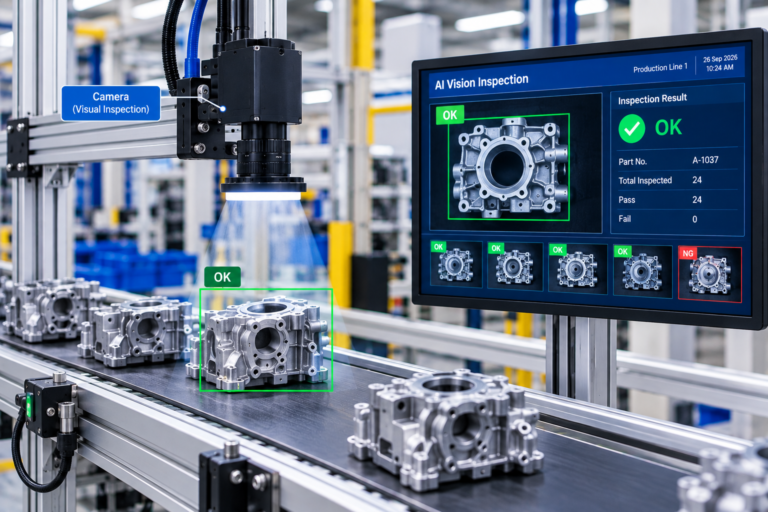
This distinction matters because even a correctly written and clearly delivered instruction cannot guarantee flawless execution every time. An operator may have been shown exactly what to do and still produce an assembly with a missing component, a reversed connector, or a visible defect, not because the instruction was unclear, but because manual work is not infallible. AI-powered computer vision, applied through live camera monitoring, can provide an additional verification layer at this point, checking for defects or confirming that an assembly matches the expected condition before the item progresses further down the line.
It is important not to overstate what this capability does. AI visual inspection does not replace human inspection outright, and it does not eliminate operator errors as a category. What it offers is an additional, consistent check that can catch certain visible conditions that a rushed or fatigued manual inspection might miss; it functions as a second layer of verification rather than the only one.
11. Reduces Operator-to-Operator Variation Through Standardized Instructions
The same written procedure, handed to five different operators, can be executed five slightly different ways. This is not usually a sign of poor training; it is a natural result of personal interpretation, prior habits carried over from other tasks, or simple differences in how thoroughly each person reads a document. Over time, this operator-to-operator variation shows up as inconsistent quality, inconsistent cycle times, and difficulty tracing why one shift’s output differs from another’s.
Standardized instructions reduce this variation by presenting the same approved process reference to every operator working the same task, regardless of shift, workstation, or plant location. Because the instruction itself is guided and structured, there is considerably less room for personal interpretation to alter how the task is actually carried out. Consistency across operators, shifts, and workstations becomes a natural outcome of everyone working from an identical, approved digital source rather than from slightly different memories of the same paper document.
12. AI Can Convert Existing Documents Into Structured Work Instructions
Most plants already have a substantial library of process knowledge sitting in PDFs, Word documents, scanned images, and paper travelers accumulated over years of operation. This material often contains genuinely useful steps, parameters, and checkpoints, but it is rarely organized in a way that is easy to convert into a structured digital format without significant manual rework.
AI document understanding and workflow generation can identify and structure this existing content by extracting steps, images, parameters, and checkpoints from an uploaded document and arranging them into a structured digital work instruction.
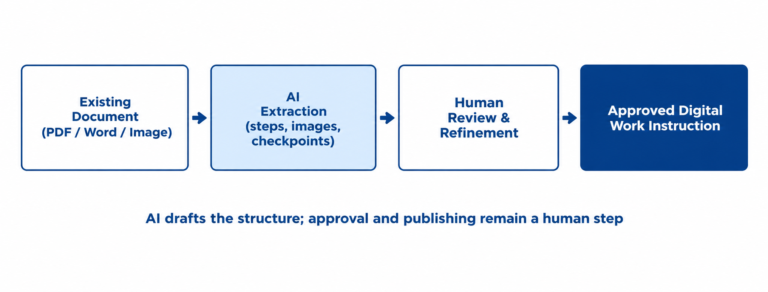
It is worth being clear that this conversion step does not, by itself, directly prevent operator errors. What it contributes is more indirect: turning previously scattered, inconsistently formatted information into structured, clearer instructions that are easier to access at the workstation, with important steps and checkpoints presented consistently rather than buried in dense paragraphs. Human review and approval remain an essential part of this process before anything reaches the shop floor, since an AI-generated draft is a starting point for a supervisor or process engineer to check, not a finished, approved procedure on its own.
Conclusion: Making Shop-Floor Tasks Easier to Perform Correctly
Operator error rarely traces back to a single cause. It tends to accumulate from several smaller gaps working together: a step relying on memory, a sequence left open to interpretation, a visual detail buried in a busy image, an outdated procedure still in circulation, a quality check that was easy to skip under time pressure, a measurement recorded by hand, or an instruction that was not fully understood in the operator’s language.
Digital Work Instruction addresses these gaps not through one single feature, but through a connected set of capabilities working together: step-by-step guidance, correct sequencing, visual and 3D instructions, highlighted critical details, current approved procedures, mandatory checklists, quality verification, support for mistake-proofing principles like Poka-Yoke, stronger First-Time-Right performance, accurate measurement capture, traceability, AI-powered translation, AI visual inspection, standardized execution across operators, and structured conversion of existing documentation.
Digital Work Instruction can deliver measurable ROI by reducing operator errors, rework, and time spent on repeated corrections. Better guidance improves First-Time-Right (FTR) performance, reduces manpower wastage, and allows operators to spend more time on productive activities. This can contribute to higher productivity, smoother production flow, and lower operational costs.